How to Choose a Gaming Mouse: The Key Specs That Actually Matter
Choosing a gaming mouse is not always as simple as picking the model with the highest DPI or the lowest weight. Modern gaming mice can come with a long list of specifications, from sensor resolution and polling rate to wireless technology, switch design, and battery life. The numbers can be useful, but they do not always tell you how the mouse will actually feel during a game.
A better approach is to look at the specifications that affect everyday use. How accurately does the mouse track? How quickly does it respond? Does the shape suit your hand? Is the wireless connection stable? These are the details that usually make a real difference.

1. Sensor Performance Comes First
The sensor is the part of a mouse that tracks your movement and turns it into movement on the screen. A good gaming mouse sensor should provide consistent tracking without unexpected acceleration, skipping, or unwanted movement.
DPI is often the first specification players notice. However, a very high DPI does not automatically make a mouse more accurate. Most players use a much lower setting and care more about predictable tracking and fine control.
This matters most in games that require precision. In an FPS, for example, small mouse movements can determine whether a shot lands exactly where you intended. A reliable sensor should simply follow your hand without making you think about the sensor itself.
2. Does a Higher Polling Rate Really Matter?
The polling rate tells you how often the mouse reports its position to the computer. A 1000Hz mouse reports every millisecond, while an 8000Hz mouse can report every 0.125 milliseconds. That is why the 8K polling rate mouse has become a popular choice among competitive players. A higher reporting rate can make cursor movement feel smoother and reduce the time between physical movement and the next reported update.
Still, 8K is not automatically necessary for everyone. Your monitor refresh rate, system performance, and the games you play all matter. The useful thing is having the option to run a higher polling rate when your setup can take advantage of it.
3. Weight Changes the Way a Mouse Moves
Weight is one of the easiest differences to notice when switching between gaming mice.
A lightweight gaming mouse generally takes less effort to move and reposition. That can be helpful for players who use low sensitivity and move the mouse across a large area of the desk, especially during FPS games. But lighter is not always better. Some players prefer a heavier mouse because it feels more stable and controlled. The important point is that the weight should work with your grip and sensitivity rather than being chosen simply because a product has a smaller number on the specification sheet. A well-balanced mouse can feel lighter in use than its actual weight suggests.
4. Shape Matters More Than Most Specification Sheets Suggest
There is one important part of a mouse that cannot be measured by DPI or polling rate: how well it fits your hand. Palm, claw, and fingertip grips create different requirements. Hand size matters too. A mouse that feels comfortable for one player may feel too narrow, too short, or too tall for another. An ergonomic gaming mouse should support a natural hand position without forcing your fingers or wrist into an awkward angle. This becomes increasingly noticeable during longer gaming sessions. A mouse can perform perfectly on paper and still be frustrating to use if the shape does not suit you. For that reason, ergonomics should be considered alongside sensor performance rather than treated as a secondary feature.
5. Wireless Performance Is About Stability
Wireless gaming mice have come a long way, but connection stability still matters. Nobody wants to think about interference, signal drops, or inconsistent response in the middle of a match.
A reliable wireless gaming mouse should maintain a stable connection in a normal desktop environment, even when other wireless devices are nearby. This is especially relevant for gaming setups with wireless keyboards, headsets, controllers, and other peripherals.
The best wireless connection is usually the one you stop noticing. Once the connection is stable, the mouse should feel just as natural to use as a wired model.
6. Click Feel Is Part of Performance
Mouse movement gets most of the attention, but clicking is just as important. Every shot, ability, selection, and command starts with a physical click. The switch affects more than durability. It also influences the force required, the feedback you feel, and how consistent the click remains over repeated use.
This is an area where gaming mouse design has started to move beyond traditional mechanical switches. Electromagnetic systems offer another way to approach click response, with the potential to focus more closely on the relationship between the physical input and the feedback under your finger.
How Does the AULA X5 Approach These Details?
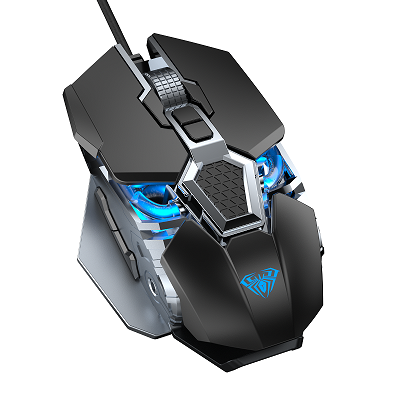
The AULA X5 gaming mouse takes a broader approach instead of focusing on a single headline specification. AULA's design puts particular attention on two parts of the experience: wireless connection and click feedback. The X5 uses AULA's StellarLink AI Adaptive Frequency Hopping technology. The system is designed to adjust its frequency strategy according to the surrounding wireless environment, helping the mouse maintain a reliable connection when several wireless signals are present. For a player, the benefit is simple. You should be able to move and click without constantly wondering whether the wireless connection is keeping up.
Electromagnetic Click Technology
The other major part of the X5 is its SSHS (StellarLink Stepping Haptic System). It uses electromagnetic micro-switch technology to focus on click response and tactile feedback. The idea is not simply to make a click faster. It is to create a click that feels clear and deliberate while maintaining a consistent response over repeated use.
That matters in fast-paced games, but it can also change the everyday feel of the mouse. A good click should become part of the player's muscle memory rather than something they need to consciously adjust to.
What Should You Actually Look For in a Gaming Mouse?
There is no single specification that makes one mouse better for every player. A competitive FPS player may care deeply about sensor tracking, weight, and polling rate. A player who spends hours at the desk may put more emphasis on shape and comfort. Someone building a clean wireless setup may care most about connection stability and battery performance.
A sensible shortlist usually starts with a few questions:
Does the sensor track consistently?
Is the polling rate suitable for your system and display?
Does the weight match your playing style?
Does the shape fit your hand and grip?
Can the wireless connection remain stable?
Do the clicks feel consistent and responsive?
Once those basics are right, additional features become much easier to evaluate.
The Best Gaming Mouse Is the One That Feels Right in Use
Gaming mouse specifications are useful, but numbers only tell part of the story. DPI, polling rate, weight, switches, and wireless technology all contribute to the final experience, yet none of them works in isolation.
The real goal is a mouse that tracks accurately, moves naturally, stays connected, and gives you confidence when you click. That is the approach behind the AULA X5. Rather than chasing specifications for their own sake, AULA focuses on the parts of the experience players interact with every second.
A good gaming mouse should eventually disappear into the background. You stop thinking about the sensor, the connection, or the click—and focus entirely on the game.
AULA X5 — Precision You Feel. Connection You Trust.
Fuel Your Passion.