What Does a Good Gaming Keyboard Sound Like? AULA Keyboard Sound Review
When choosing a gaming keyboard, it's easy to get caught up in the numbers. Polling rate, response time, Rapid Trigger, and actuation point all matter, especially for competitive gaming. But spend enough time using a keyboard, and another question starts to matter just as much: How does it sound?
The sound of a mechanical keyboard becomes part of your everyday experience. It follows every keystroke, whether you're playing an intense FPS match, typing late at night, or spending a few quiet hours at your desk. A keyboard can have impressive specifications and still feel less satisfying if its sound is too hollow, too sharp, or simply not what you enjoy.
After exploring different AULA gaming keyboards, one thing becomes clear: there is no single sound that everyone will love. Some users prefer a deep, rounded thock. Others enjoy a crisp clack, while some want a softer, more muted typing experience. The real question is not which keyboard sounds the best to everyone, but what makes a keyboard sound the way it does—and which sound feels right to you?
The Switch Is Only the Beginning
Switches are usually the first thing people consider when talking about mechanical keyboard sound, and for good reason. Linear switches generally offer a smooth keystroke without a tactile bump, tactile switches provide a noticeable bump, and clicky switches produce a distinct audible click. Each type creates a different starting point for the typing experience.
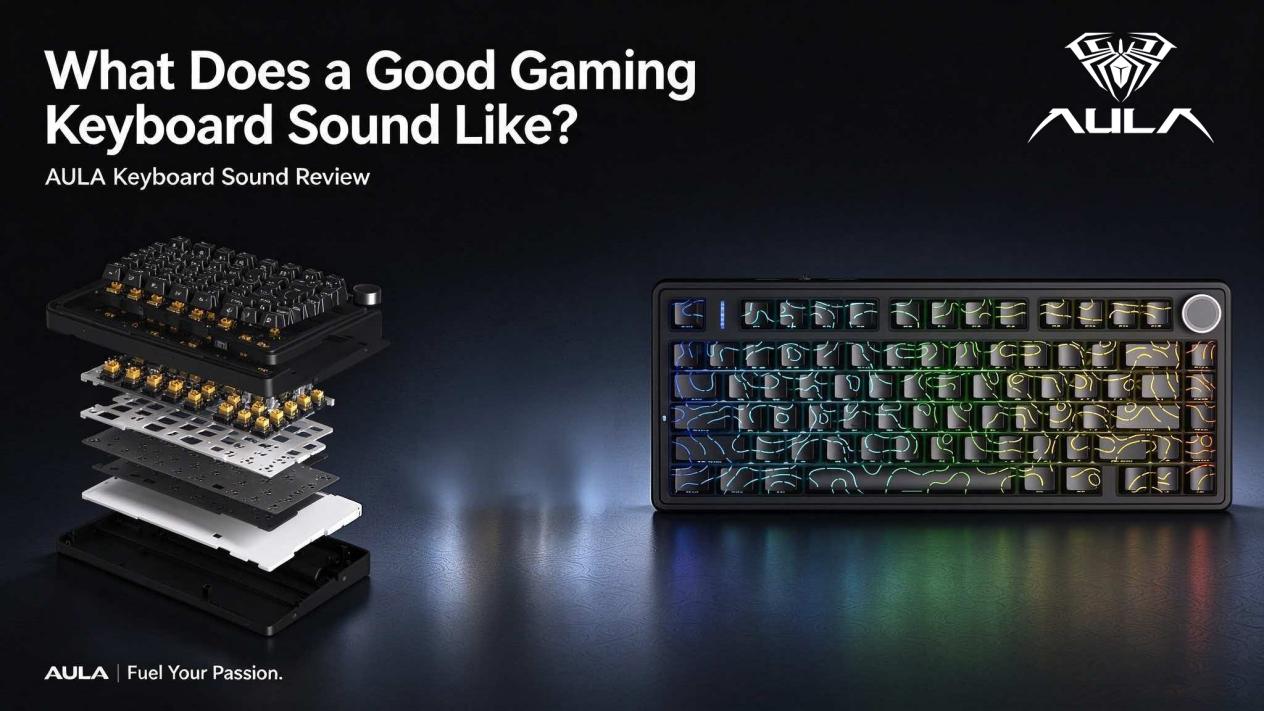
However, the switch is only one part of the equation. When you press a key, the resulting vibration travels through the keycap, switch housing, plate, PCB, case, and any internal dampening materials before reaching your ears. The way these components interact affects the pitch, resonance, and perceived sharpness of each keystroke.
That's why two mechanical keyboards using similar switches can sound surprisingly different. One may produce a deeper, more controlled tone, while another sounds brighter and more pronounced. The difference often comes from the complete keyboard design rather than the switch alone. When reviewing gaming keyboard sound, it makes more sense to consider the entire structure instead of judging a keyboard by its switches in isolation.
Thock, Clack, or Something in Between?
Keyboard sound is highly subjective. Terms such as thock, clack, and click are informal descriptions rather than standardized acoustic measurements, but they help explain the qualities people notice when comparing mechanical keyboards.
Thock: Deep and Rounded
A thocky keyboard typically produces a deeper, fuller sound with a rounded character. For many enthusiasts, that sound feels satisfying without being overly sharp or harsh. It can be particularly appealing during long typing sessions, when a softer acoustic profile makes the keyboard feel more relaxed.
Clack: Crisp and Defined
A clacky keyboard usually produces a brighter sound with more noticeable definition between keystrokes. Some users enjoy this lively response because each press sounds distinct, especially during fast typing or repeated in-game actions. The result depends on the switches, keycaps, plate, and overall construction.
Clicky: Audible Feedback with Character
Clicky mechanical switches introduce a deliberate clicking sound as part of their operation. For users who enjoy pronounced auditory feedback, this can be one of the most satisfying aspects of a mechanical keyboard. However, the sound may be distracting in shared rooms or quiet working environments.
Muted: Controlled Rather Than Lifeless
A muted keyboard sound is not necessarily dull. When the keyboard is well tuned, the keystrokes can feel more controlled, with less unwanted resonance and fewer distracting noises. The goal is not simply to make every sound quieter, but to create an acoustic profile that feels consistent.
Ultimately, a good gaming keyboard does not have to be the loudest, deepest, or crispest. It needs a sound character that matches the user's preference and the environment in which the keyboard will be used.
Why Keyboard Structure Changes the Sound
One common mistake when comparing mechanical keyboards is focusing entirely on the switches. The internal structure can be just as important in shaping keyboard acoustics.
The plate influences how the keyboard responds to each keystroke, while the case affects resonance and the way vibration travels through the assembly. Internal materials such as PORON foam, IXPE pads, PET sheets, and other dampening layers may help control certain unwanted vibrations. Their actual effect depends on the material, thickness, placement, and the rest of the keyboard's construction.
A gasket-mounted keyboard uses cushioning between parts of the internal assembly to change how the plate and PCB are supported. Depending on its design, this arrangement can create a different sense of flex and influence the sound of bottoming out. It does not automatically guarantee a better sound, though. The result still depends on the entire keyboard.
The enclosure matters, too. Different case materials and internal layouts can produce different acoustic responses, even when the keyboards share a similar layout and switch type. This is why mechanical keyboard sound should be evaluated as the result of a complete system—not a single component or marketing feature.
The Bottom-Out Tells You More Than You Might Expect
If you want to understand a keyboard's sound, pay attention to what happens when a key reaches the end of its travel. This is commonly called the bottom-out, and it can reveal a lot about the keyboard's acoustic character.
Try pressing the same key slowly, then at your normal typing speed, and finally during a faster typing sequence. You may notice that the sound changes as your force and typing rhythm change. A controlled bottom-out should feel reasonably consistent rather than harsh or unexpectedly hollow.
The sound of larger keys deserves special attention. Space, Enter, Backspace, and Shift use stabilizers to help keep the keycap level during a press. If these components are loose or poorly tuned, you may hear ticking or rattling that stands out against the rest of the keyboard.
A well-controlled stabilizer sound makes the larger keys feel more consistent with the smaller ones. When reviewing a gaming keyboard sound profile, don't judge the board solely by tapping a few letter keys. The Space Bar and Enter key can reveal acoustic issues that are easy to miss during a quick demonstration.
The Unwanted Sounds Worth Listening For
A useful keyboard sound review should consider more than whether a board sounds deep or crisp. Small mechanical noises can become distracting after hours of use, particularly when they contrast with otherwise clean keystrokes.
Spring ping is a high-pitched metallic noise that may occur during key travel. Stabilizer rattle is usually more noticeable on larger keys, while hollow resonance creates an empty, echo-like character. Some switches may also produce a scratchy sound as their moving parts travel against one another. Squeaks and small ticks can be equally noticeable in a quiet room.
Not every keyboard will exhibit these sounds, and their severity varies by design and individual unit. Still, they are worth checking when comparing mechanical keyboards. A short typing test may not reveal everything, so spend some time using the keyboard at different speeds and listen for noises that interrupt the overall experience.
The objective is not to demand absolute silence from a mechanical keyboard. Mechanical switches naturally produce sound. What matters is whether that sound feels consistent and intentional, rather than being dominated by unwanted rattling, pinging, or resonance.
How Keycaps Influence Gaming Keyboard Sound
Keycaps affect both the way a keyboard feels and the way it sounds. Their material, thickness, shape, and profile can change the acoustic response, even when the switches and keyboard structure remain unchanged.
PBT keycaps are popular among mechanical keyboard enthusiasts because of their material characteristics and textured feel. Depending on their construction and the keyboard beneath them, they can contribute to a different sound from other keycap materials. However, it would be misleading to claim that all PBT keycaps automatically sound deeper or better.
Keycap profile also changes the distance between the keycap and other parts of the keyboard, which can affect the sound produced during a keystroke. Thicker keycaps may respond differently from thinner ones, but the final result still depends on the switch, plate, case, and internal structure.
This is part of what makes mechanical keyboards enjoyable to customize. Changing keycaps can alter the look and feel of a familiar board while giving users another way to explore their preferred keyboard sound profile. Your keyboard does not have to sound exactly like someone else's to feel right.
AULA Keyboard Sound: Different Designs, Different Experiences
AULA gaming keyboards cover different layouts, structures, and typing experiences. Rather than expecting every model to produce the same sound, it is more useful to consider how each keyboard's design influences the overall feel and acoustic response.
The AULA BOX63 brings a compact layout and magnetic-switch design into the gaming keyboard category. For users evaluating this type of keyboard, sound is only one part of the experience; key travel, actuation behavior, and the feel of repeated presses also matter. The best way to judge its acoustic character is to listen to it during both deliberate typing and faster gaming inputs.
The AULA F75 HE can be discussed from a different perspective, with attention to its layout, internal construction, and the way those elements shape the typing experience. A gasket structure and internal dampening, where included in the specific model, can influence the sense of bottom-out and the sound of the completed assembly. These features should be considered together rather than treated as guarantees of a particular thock or clack.
Other AULA keyboards may use different switches, keycap designs, cases, and internal structures, creating their own acoustic characteristics. That variety matters because keyboard enthusiasts do not all want the same thing. Some prioritize a softer typing sound, while others prefer a more pronounced mechanical response.
For AULA, the more useful comparison is not simply which model sounds louder or deeper. It is how each keyboard balances its acoustic character with the gaming features, layout, and typing feel that matter to its intended users.
How to Evaluate a Mechanical Keyboard Before Buying
A keyboard sound test is most useful when you listen for specific details rather than relying on a single word such as thocky. Start with ordinary typing, because it shows how the keyboard sounds across different keys and typing rhythms. Then test the Space Bar, Enter, Backspace, and Shift to check for stabilizer noise.
Listen to the top-out as well as the bottom-out. The top-out is the sound made as the key returns after being pressed, and it may reveal noises that are less obvious when a key is held down. If possible, compare the keyboard at a relaxed typing speed and during faster input.
It is also worth considering where you will use the keyboard. A more pronounced acoustic profile may be enjoyable in a private gaming room but less suitable in a shared workspace. If sound recordings are part of your buying decision, remember that microphones, recording distance, background noise, and audio processing can all change how a keyboard sounds in a video.
Most importantly, use the specifications and sound as complementary information. Features such as polling rate, Rapid Trigger, and actuation settings help explain a keyboard's gaming capabilities; listening tests help you judge whether its acoustic character suits your preferences.
The Best Gaming Keyboard Sound Is the One You Enjoy
After spending enough time with mechanical keyboards, the question often changes from "Which keyboard sounds the best?" to "Which sound do I want to live with?"
If you spend most of your time gaming, you may prefer a controlled sound that remains comfortable during long sessions. If you type throughout the day, a deeper or more muted profile might appeal to you. And if you enjoy the mechanical keyboard hobby, you may want to experiment with switches, keycaps, stabilizers, and internal dampening until you find a combination that feels personal.
There is no universal answer. The same acoustic profile that one person describes as satisfying may sound too loud or too soft to someone else. That is why listening, typing, and comparing the complete keyboard matters more than chasing a trend.
Final Thoughts
Specifications tell you what a gaming keyboard is designed to do. Its sound adds another dimension to the experience—one that you notice every time you press a key.
When evaluating an AULA keyboard or any other mechanical keyboard, listen to the bottom-out, the top-out, and the larger keys. Pay attention to spring ping, stabilizer rattle, hollow resonance, and the overall balance of the sound. Then spend enough time typing and gaming to decide whether the acoustic character remains enjoyable.
A good keyboard sound is not defined by a single switch type, material, or construction method. It comes from the way those elements work together, along with the preferences of the person using the board.
AULA | Fuel Your Passion